WORKFLOW GUIDEUPDATED OCT 2026CHROME · BRAVE · ARC · EDGE
HOW TO ORGANIZE YOUR PERPLEXITY LIBRARY & SEARCH HISTORY
Once you pass a few hundred Perplexity searches, finding an answer from two weeks ago becomes frustrating when every thread starts with 'Can you explain...' or 'What is the best...'. Here is a repeatable system for keeping your Perplexity Library clean.
You can organize your Perplexity.ai Library automatically with Auto-Rename for Perplexity by combining three built-in features: 3–7 word semantic auto-titling after the first answer streams, custom title prefixes (such as [Research] or [Client]) for instant visual grouping, and regex exclude rules (like ^define\b) so quick dictionary or translation lookups are never renamed.
3 Layers of a Clean Perplexity.ai Library
Perplexity Spaces are great for grouping curated collections, but 90% of daily searches happen directly from the home bar or omnibox and land straight in your chronological Library. Combining Perplexity’s built-in Spaces with automatic thread naming solves daily clutter without manual upkeep:
Layer 1 — Noun-phrase 3–7 word titles: Strip conversational filler ("Hey please help me understand...") and preserve technical identifiers, acronyms, error codes, and proper nouns (e.g., PostgreSQL MVCC Autovacuum Tuning).
Layer 2 — Optional Title Prefixes: Prepend a tag such as [Thesis], [Backend], or [Tax] from the toolbar popup during focused research sprints so related threads cluster visually in your sidebar.
Layer 3 — Regex Exclude Rules: Keep one-off throwaway queries (definitions, translations, quick sanity checks) from burning LLM tokens or cluttering your rename history.
Recommended Regex Exclude Patterns for Daily Use
In Auto-Rename’s Settings page (options.html), each line in Exclude Patterns is compiled as a case-insensitive regular expression tested against your opening question before any LLM request is made:
Regex Pattern
What It Skips
Why It Helps
^define\b
"define epistemological"
Short two-word definitions are already self-descriptive.
^translate\b
"translate guten abend to english"
Avoids renaming disposable translation checks.
^(hi|hello|test)\b
"test", "hello"
Skips connectivity or prompt warm-up messages.
^weather\b
"weather in Dresden tomorrow"
Leaves ephemeral local lookups untouched.
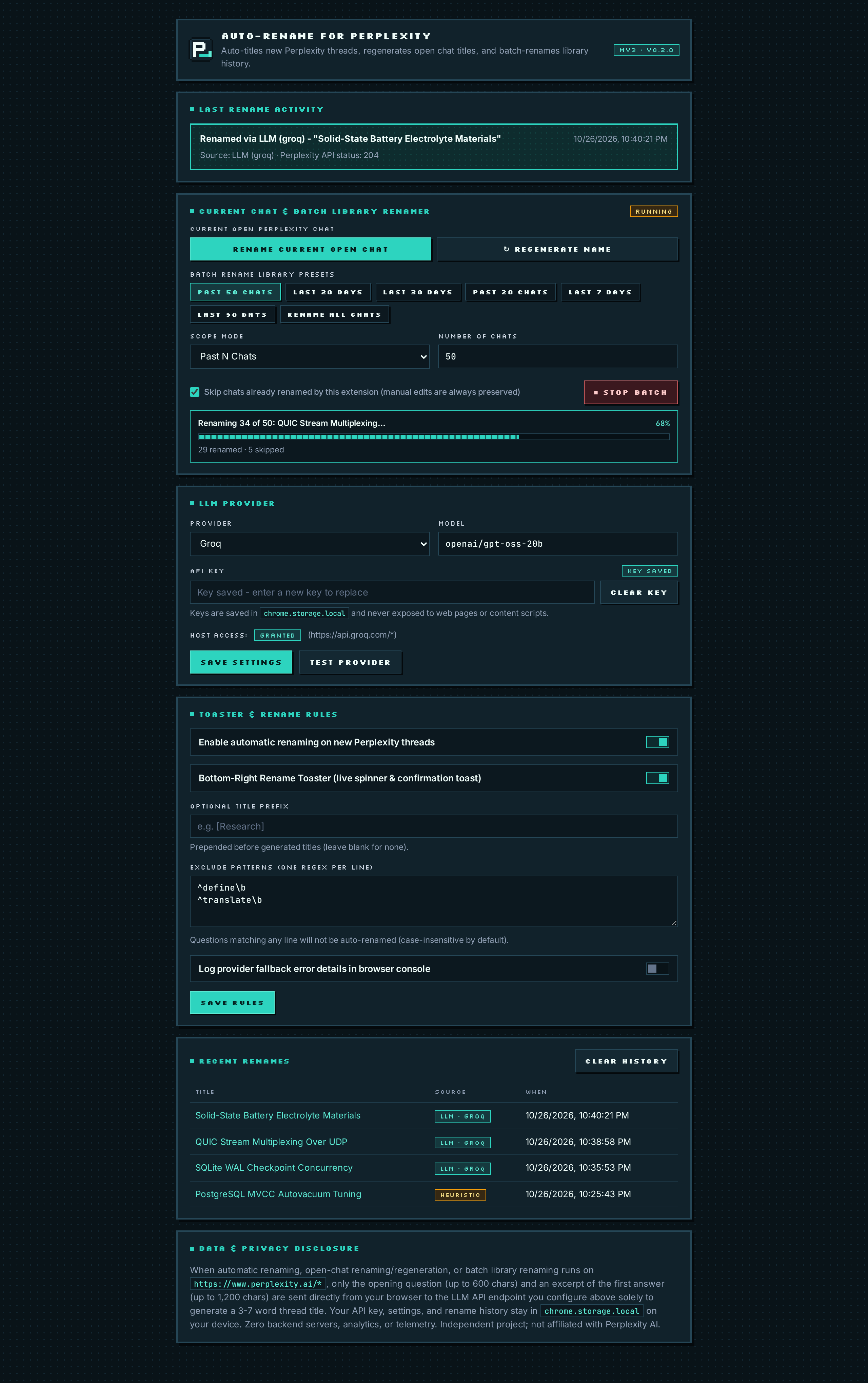
Full Settings view: configure prefixes, per-line regex exclusions, and inspect your local rename log.
Switching Prefixes Fast from the Toolbar Popup
You don’t need to open the full Options page when switching tasks. Click the extension’s pixel P_ toolbar icon to toggle auto-renaming on/off, toggle the bottom-right HUD toaster, or set a temporary Title Prefix (for example [Paper Review]) in two seconds. Auto-Rename automatically prevents double-prefixing if the model already includes your tag.
Frequently Asked Questions
DO RENAMED TITLES SYNC TO THE PERPLEXITY MOBILE APP AND LIBRARY SEARCH?
Yes. Because Auto-Rename updates the thread via Perplexity's own server-side title endpoint (HTTP 204), the clean 3–7 word title persists across web reloads, Library search, and mobile devices signed into your Perplexity account.
WHAT HAPPENS IF I TYPE AN INVALID REGULAR EXPRESSION IN EXCLUDE PATTERNS?
Auto-Rename compiles each regex safely inside a guard and ignores malformed expressions without crashing or blocking valid patterns.
CAN I BATCH-RENAME OLD THREADS ALREADY IN MY PERPLEXITY LIBRARY?
Yes! Automatic mode only names brand-new threads so old threads are never touched unexpectedly, AND v0.2.0+ includes a dedicated Batch Library Renamer in both the toolbar popup and Settings page—letting you retroactively rename the Past 50 / 20 Chats, the Last 20 / 30 Days of your Library, or All Library Chats while skipping already-renamed and manually edited titles.
Tired of Perplexity.ai using your raw prompt, stack trace, or truncated paragraph as the thread title? Fix Perplexity Library titles automatically in 60 seconds with Auto-Rename for Perplexity.
Step-by-step unpacked installation guide for Auto-Rename for Perplexity across Google Chrome, Brave, Arc, Microsoft Edge, and Vivaldi—no Chrome Web Store account or Node.js required.
Compare all 10 supported LLM providers plus zero-key offline mode in Auto-Rename for Perplexity—including free Groq (gpt-oss-20b), Gemini 2.5 Flash, OpenRouter :free, and 100% local Ollama.
ChatGPT and Claude automatically summarize new chats into short 3–6 word titles, while Perplexity.ai keeps your raw prompt. Learn why—and how to add automatic AI thread titles to Perplexity.
How to upgrade your daily Perplexity.ai research workflow in Chrome, Brave, Arc, and Edge with open-source Manifest V3 tooling, clean 3–7 word Library titles, and strict API key privacy.